How to Send Bulk WhatsApp Messages Legally and Effectively
WhatsApp is the highest-engagement messaging channel in the world — 98% open rate, 45–60% click-through on well-crafted campaigns. But it's also the platform that will permanently ban your phone number the moment it detects spam behavior. Businesses that try to shortcut the process lose their numbers, their customer contact lists, and sometimes their entire WhatsApp Business account.
The good news: there is a completely legitimate, scalable way to send bulk messages on WhatsApp. It requires setup, but the results justify every step.
Legitimate Broadcast vs. Spam: What's the Difference?
Many businesses confuse "bulk messaging" with "spam." WhatsApp draws a sharp line between the two:
Spam (what gets you banned):
- Using unofficial third-party tools to blast messages to numbers scraped from the web
- Sending messages to users who never gave consent
- Using modified WhatsApp apps (GB WhatsApp, WhatsApp Plus) for mass sends
- Sending the same message to hundreds of contacts via the personal WhatsApp Business app
Legitimate bulk messaging (what actually works):
- Sending pre-approved template messages via WhatsApp Business API
- Only messaging contacts who have opted in to receive communications from your business
- Using a verified BSP (Business Solution Provider) platform for campaign management
The difference is not just ethical — it's structural. Legitimate API-based broadcasts go through Meta's infrastructure with built-in rate limiting and compliance checks. Spam attempts bypass this and trigger automated detection.
Two Non-Negotiable Requirements
Before you send a single bulk message, you must meet two requirements:
1. Approved Message Templates
WhatsApp does not allow free-form bulk messages. Every outbound message you send to customers (where they haven't messaged you first in the last 24 hours) must use a pre-approved template.
Templates are submitted to Meta for review. Approval typically takes 1–24 hours for standard templates. Each template has:
- A category (Marketing, Utility, or Authentication)
- Fixed text with optional dynamic variables like
{{customer_name}}or{{order_number}} - Optional header (image, document, or bold text)
- Optional call-to-action buttons
2. Contact Opt-In
You cannot message anyone who hasn't explicitly agreed to receive WhatsApp messages from your business. Opt-in must be:
- Clearly labeled (users must know they're signing up for WhatsApp messages)
- Voluntary (not buried in terms and conditions)
- Channel-specific (email opt-in doesn't count as WhatsApp opt-in)
Common opt-in collection methods: checkout page checkbox, website pop-up, QR code at point of sale, SMS confirmation flow.
How to Create a WhatsApp Template in SaleSmartly
Using SaleSmartly's WhatsApp API integration, template creation is straightforward:
- Navigate to Templates in your SaleSmartly dashboard under the WhatsApp channel settings
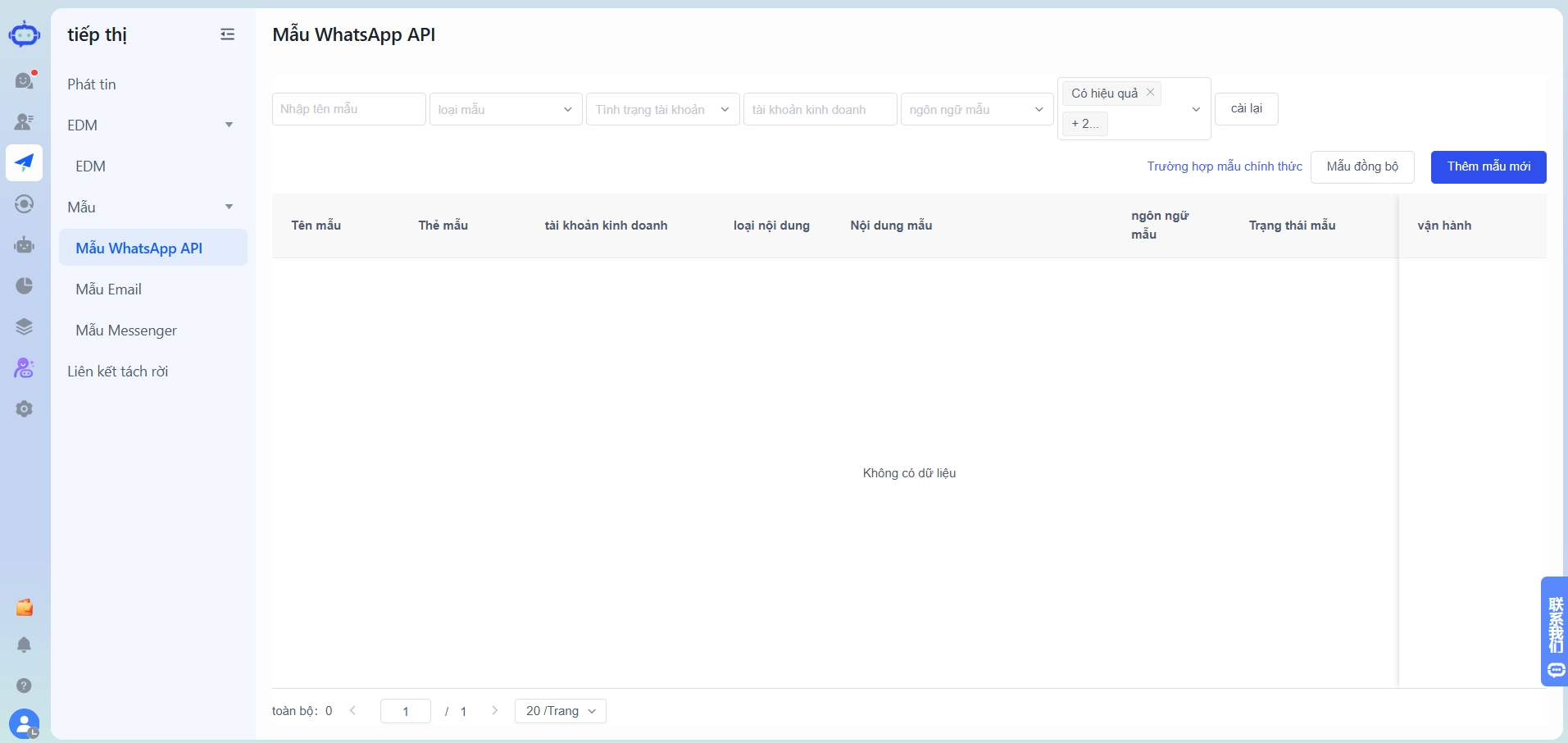
- Select template category: Marketing, Utility, or Authentication
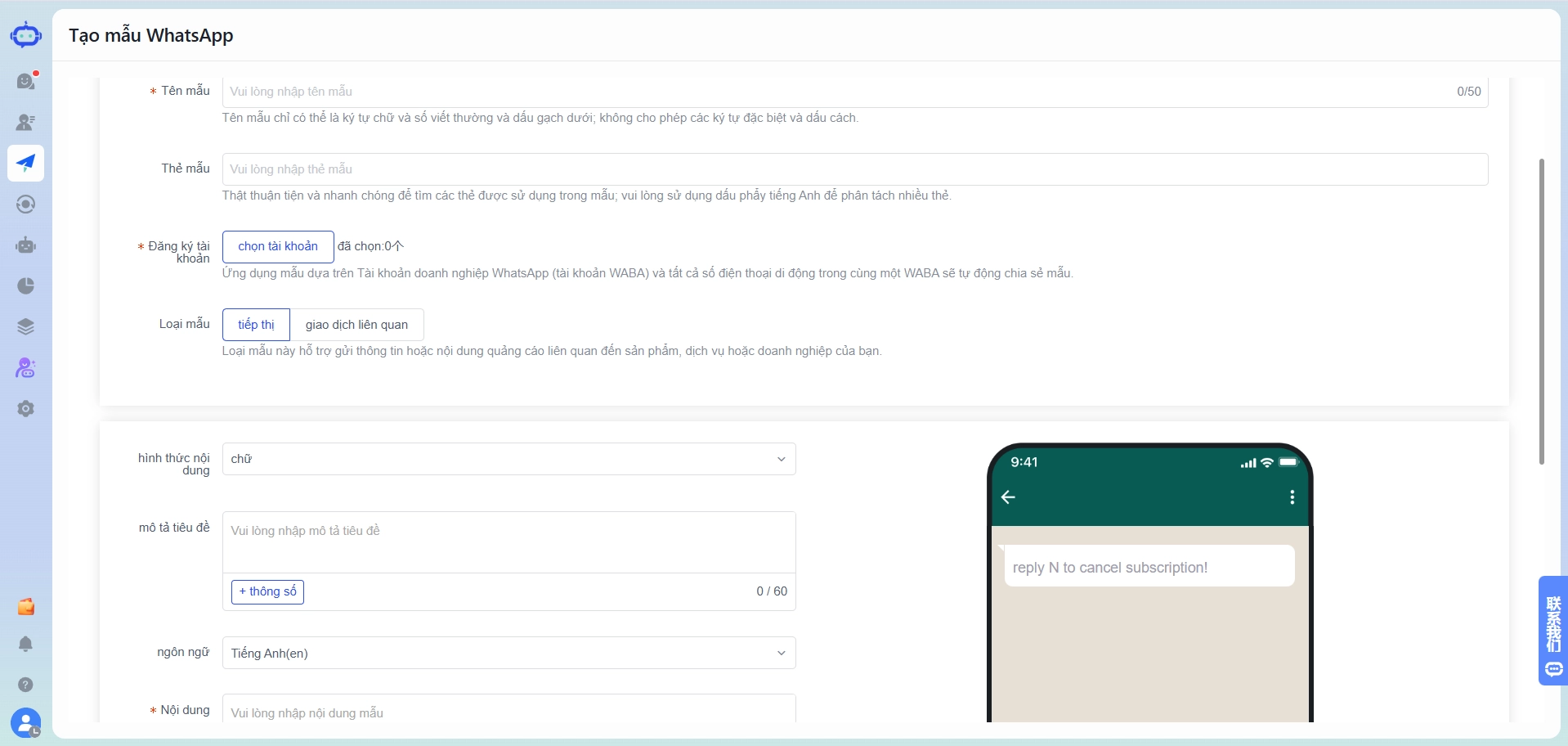
- Write your message body using
{{variable}}syntax for personalization fields - Add optional components: header image or document, footer text, quick reply or CTA buttons
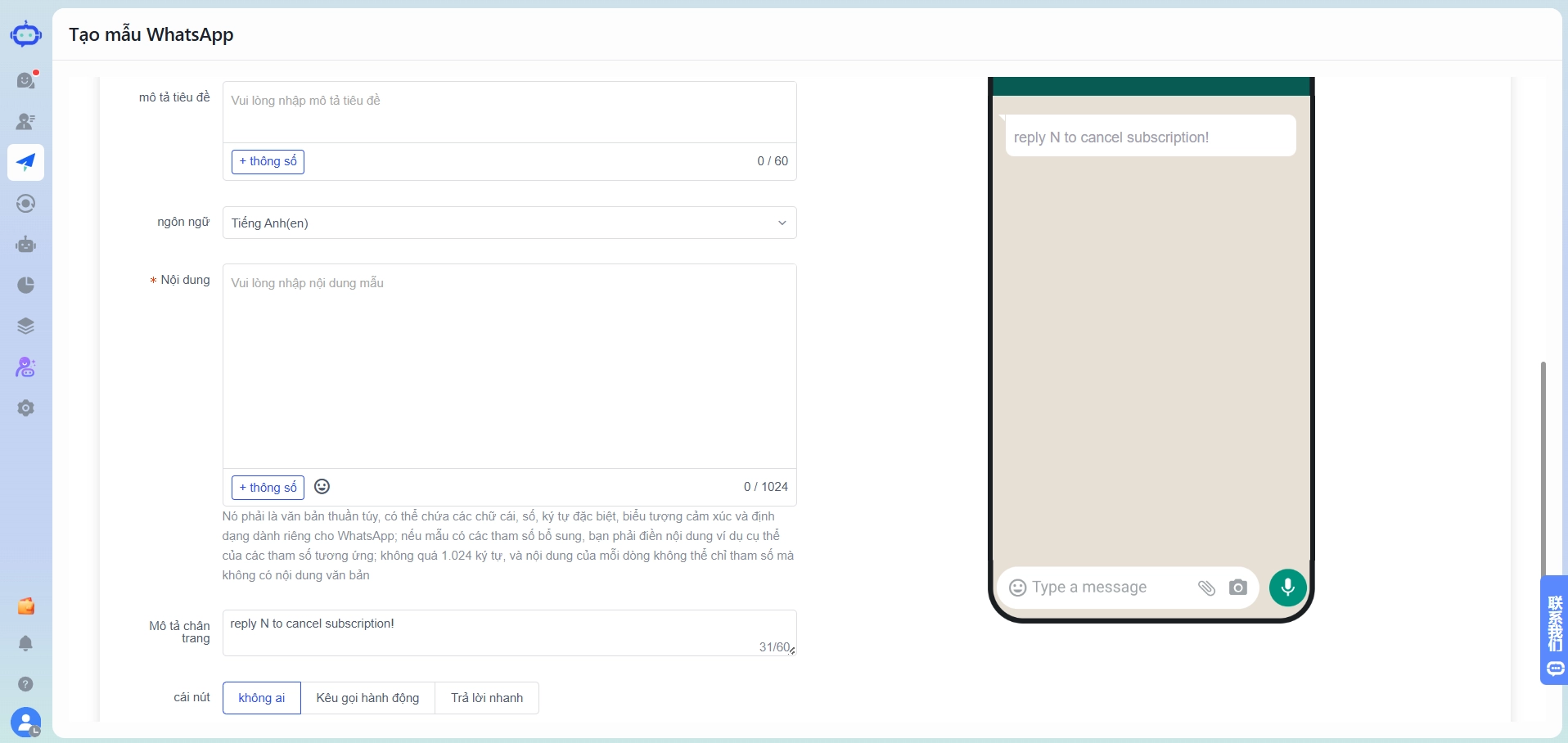
- Submit for Meta review directly from the dashboard — no separate Meta Business Manager login required
- Receive approval notification via the dashboard (usually within a few hours)
Once approved, the template is available immediately for broadcast campaigns.
Pro tip: Keep templates concise. Messages under 160 characters have the highest read-through rates. Avoid overly promotional language like "FREE!!!" or "Act NOW!" — these often trigger rejection during review.
5 Broadcast Types That Deliver Results
Not all bulk messages are created equal. Here are the five broadcast types that consistently generate measurable business outcomes:
Type 1: Promotional Campaigns
Flash sales, seasonal offers, new product launches. The highest-volume use case. Target: opted-in customers, segmented by purchase history.
Example template: "Hi
, our Tết sale starts tomorrow — up to 40% off storewide. Shop early:
\
link
\
Reply STOP to unsubscribe."
Type 2: Order Confirmations
Triggered automatically after purchase. Utility category, lower cost, very high open rate. Replaces SMS order alerts at better engagement.
Example template:** **** ****
"Your order # has been confirmed. Estimated delivery:
Track here:*
*[link]
Type 3: Appointment and Payment Reminders
Reduces no-shows for service businesses. Effective for clinics, salons, tutoring centers, and financial services.
Example template:
"Reminder: your appointment is tomorrow at
with data_objectstaff_name
or R to reschedule."
Type 4: Re-Engagement Campaigns
Target customers who haven't purchased in 60–90 days. These campaigns recover lapsed customers at a fraction of paid advertising cost.
Example template:
"We miss you,
! Here's a 15% discount code for your next order:
Valid for 7 days."
Type 5: System Notifications
Password resets, login OTPs, subscription renewals, delivery exceptions. Authentication and Utility categories. High trust, low friction.
WhatsApp Open Rate vs. Email vs. SMS
Numbers matter when justifying the investment:
| Channel | Average Open Rate | Average CTR | Avg. Response Time |
|---|---|---|---|
| 98% | 45–60% | < 3 minutes | |
| 20–25% | 2–5% | Hours to days | |
| SMS | 75–85% | 6–8% | < 5 minutes |
WhatsApp's open rate advantage is partly structural: messages appear in the same app people use to talk to friends and family. There's no spam folder. Notifications are persistent until dismissed.
For a business sending the same promotion to 1,000 contacts, WhatsApp will reach roughly 980 people who actually see it. Email reaches around 220 people. The math on ROI is straightforward.
How to Avoid Account Bans
WhatsApp monitors accounts based on several signals. Staying safe means:
Monitor your quality rating. Meta assigns each WhatsApp number a quality rating (Green, Yellow, Red). If too many recipients block or report your messages, your rating drops. A red rating leads to messaging restrictions, then a ban.
Keep block rates below 2%. If more than 2% of recipients block your number after a campaign, that's a danger signal. Improve targeting and message relevance.
Always include opt-out instructions. Include "Reply STOP to unsubscribe" or similar in every marketing message. This reduces blocks by giving recipients an alternative.
Don't send the same template repeatedly to the same contacts. Space out marketing messages to the same contact list — a minimum of 7 days between promotional sends to the same segment.
Use SaleSmartly's audience segmentation. The omni-channel platform allows you to segment contacts by purchase history, location, last interaction date, and custom tags — ensuring each broadcast goes only to the most relevant recipients.
Start with lower volumes. If you have a new WhatsApp number, don't send 10,000 messages on day one. Meta's systems flag sudden volume spikes. Ramp up gradually: 100 → 500 → 2,000 → 10,000+ over several weeks.
Measuring Campaign Performance
After each broadcast, track:
- Delivered rate: Messages successfully received (target: >95%)
- Read rate: Messages opened (WhatsApp blue ticks)
- Response rate: Replies received (for two-way campaigns)
- Click-through rate: Link clicks via tracked URLs
- Block rate: Contacts who blocked your number after receiving the message (must stay below 2%)
SaleSmartly's campaign analytics dashboard shows all of these metrics per broadcast. Use A/B testing across template variants to incrementally improve performance.
Getting Started
The fastest path to your first legitimate WhatsApp broadcast:
- Set up WhatsApp Business API through SaleSmartly
- Collect opt-in contacts (minimum 100 to make a broadcast worthwhile)
- Create and get approval for 2–3 template types (one promotional, one utility, one re-engagement)
- Run a small test broadcast of 50–100 contacts
- Review quality rating and engagement metrics before scaling
Most businesses are running their first compliant broadcast campaign within 5–7 business days of signing up. Check SaleSmartly pricing to find the plan that fits your expected message volume.
How to Set Up Zalo Auto Replies for Online Stores (Without Coding)
Step-by-step guide to setting up Zalo auto reply for your online shop. 3 types of automated responses, 5 message templates, and how to avoid spam flags — no coding required.
How to Set Up Zalo Auto Reply for Online Stores (No Coding Required)
Set up Zalo auto replies in 4 steps — no coding needed. Welcome messages, keyword triggers, after-hours responses. Keep leads 24/7 without growing your team.
