How to Set Up Zalo Auto Reply for Online Stores (No Coding Required)
11 PM. Your team is offline. A customer messages your Zalo account:*"Is the size L dress still available? I'd like to order tonight."*By morning, your staff sees the message. The customer already bought from a competitor.This happens every day across thousands of Vietnamese online stores, especially those running ads on Facebook, TikTok, or Google. When a customer sends a message, their purchase intent is at its peak. A slow response means a lost lead.The problem isn't traffic. It's response speed.## What Is a Zalo Auto Reply?A Zalo auto reply is an automated messaging system that allows a business's Zalo account to respond to customer inquiries without a support agent handling every message manually.It works by connecting your Zalo account to an automation platform and configuring response workflows triggered by events or keywords. The system runs 24/7 and handles hundreds of simultaneous conversations without adding headcount.For online stores, the practical results include:- Instant responses — even at 2 AM
- 60–80% reduction in repetitive questions handled by staff
- No lost leads outside business hours
- More consistent, professional customer experience## The 3 Most Important Types of Zalo Auto Reply### Type 1: Welcome MessagesTriggered when a customer sends their first message.A well-designed welcome message serves as the first layer of conversation routing — instead of staff asking "how can I help?", the system immediately surfaces the customer's intent and reduces unnecessary back-and-forth.Example:> "Hello ::span
Name ::! Thank you for contacting ::span Store Name ::. We specialize in ::span short description ::.
How can we help you today?1️⃣ Browse new arrivals2️⃣ Check order status3️⃣ Return & refund policy *4️⃣ Talk to customer support"*### Type 2: Keyword-Based RepliesTriggered when customers send predefined keywords: "price", "shipping", "size", "refund", "payment".For most online stores, this is the highest-impact automation layer because repetitive questions account for 70–80% of all inbound messages. Configure multiple keyword variations for each topic — customers never phrase things identically.Examples:- "shipping", "delivery", "ship fee" → send shipping fee table and estimated delivery time
- "size", "sizing", "measurements" → send the size guide
- "refund", "return", "exchange" → send return policy### Type 3: After-Hours RepliesTriggered when customers message outside business hours.Even a simple message confirming receipt and indicating when staff will respond significantly reduces lead drop-off. More advanced setups can include lead capture forms, automatic product recommendations while customers wait, and callback scheduling.Example:> *"We've received your message! Our team is currently offline but will get back to you as soon as we open. Thank you for your patience!"*For stores receiving heavy evening traffic from paid ads, after-hours automation is often the fastest way to improve lead retention.## How to Set Up Zalo Auto Replies in SaleSmartlySaleSmartly connects Zalo via cloud-hosting and lets you build automated workflows through a no-code drag-and-drop interface. See the Zalo integration guide for full setup details.### Step 1: Connect Zalo to SaleSmartly1) Log into your SaleSmartly account
- Go to Integration → Zalo
- Click Add Device
- Log into your store's Zalo account
- Scan QR code to give authority to SaleSmartly
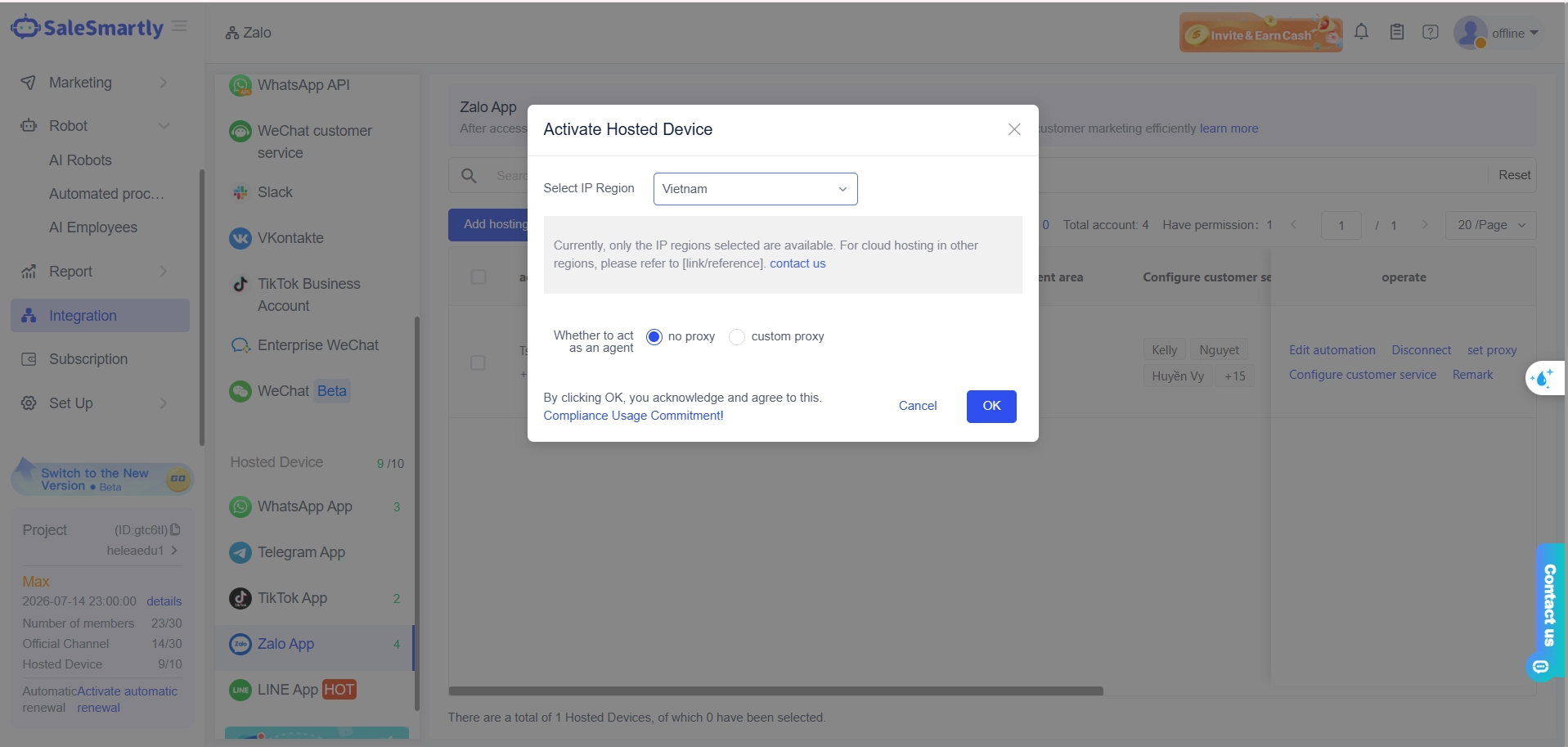 ### Step 2: Set Up Welcome Messages1) Go to Robot → Automation → New Flow
 - Select trigger: New customer welcome message
- Add a Send Message action
- Write your welcome message content and save
- Activate the workflow
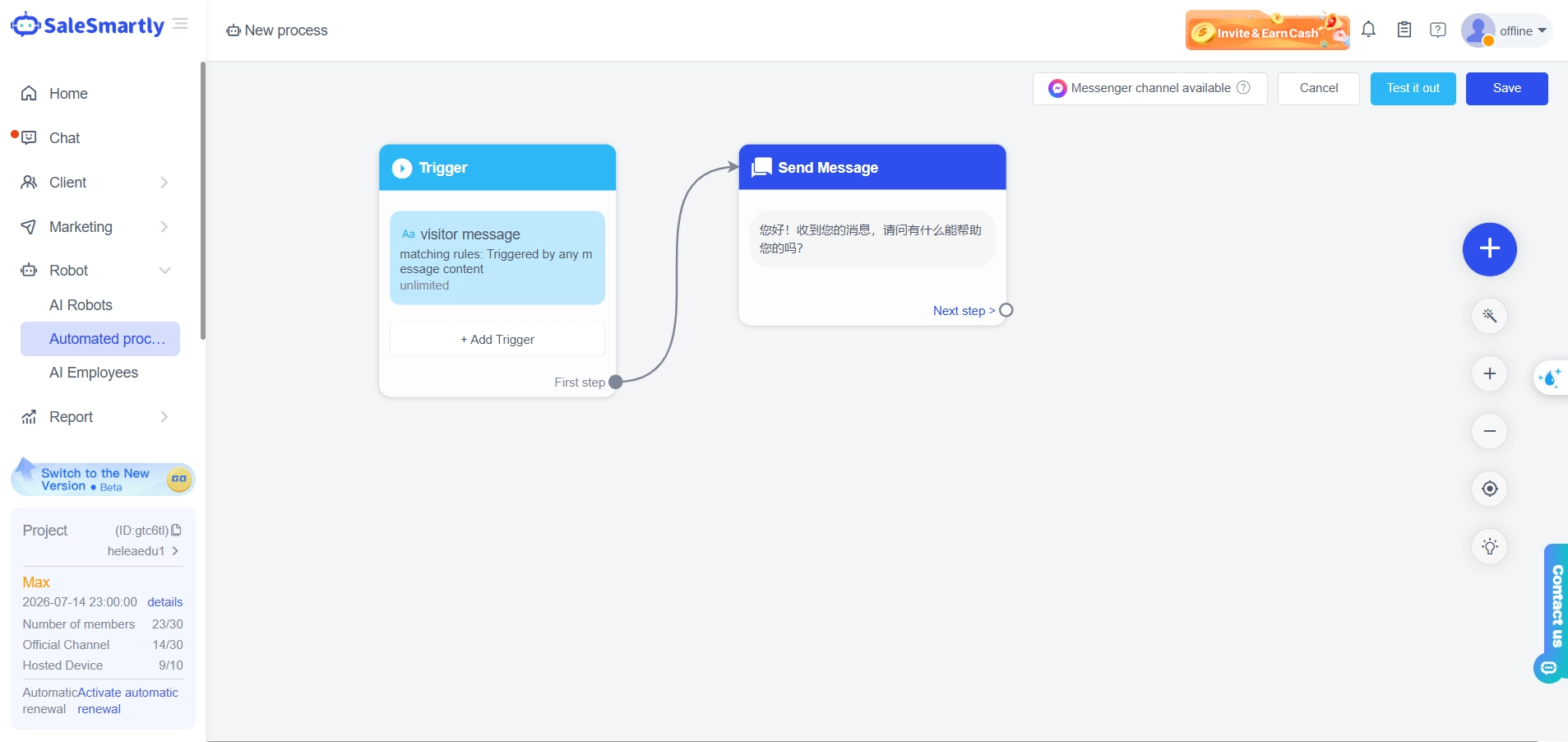 ### Step 3: Set Up Keyword-Based Replies1) Go to Robot → Automation → New Flow → Keyword detection
 - Create a new keyword group
- Add target keywords and variations
- Write the automated response
- Activate
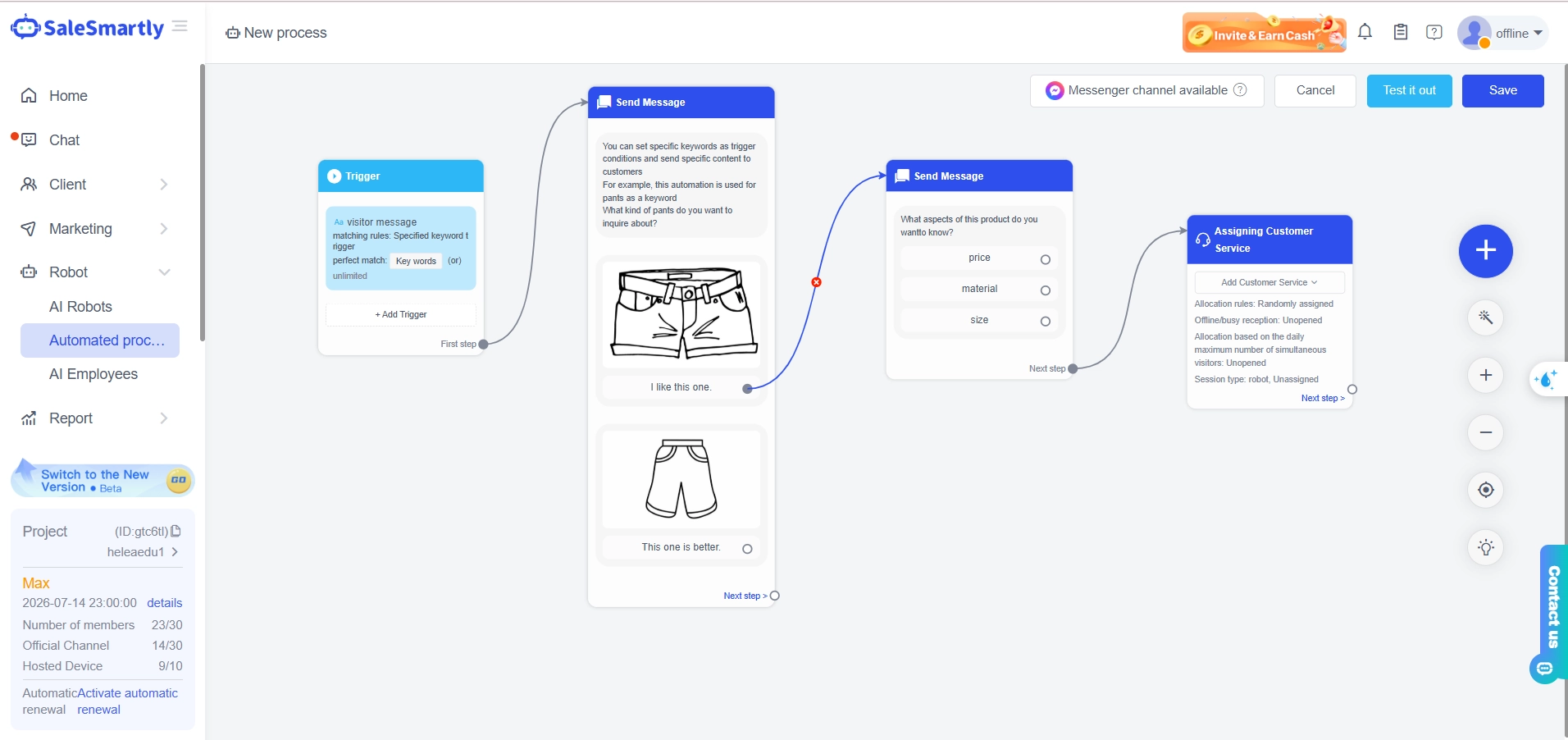 ### Step 4: Set Up After-Hours Automation1) Go to Robot → Automation → New Flow → After-hours autoresponder
 - Configure your business schedule
- Write the after-hours response
- Optionally add a lead capture button
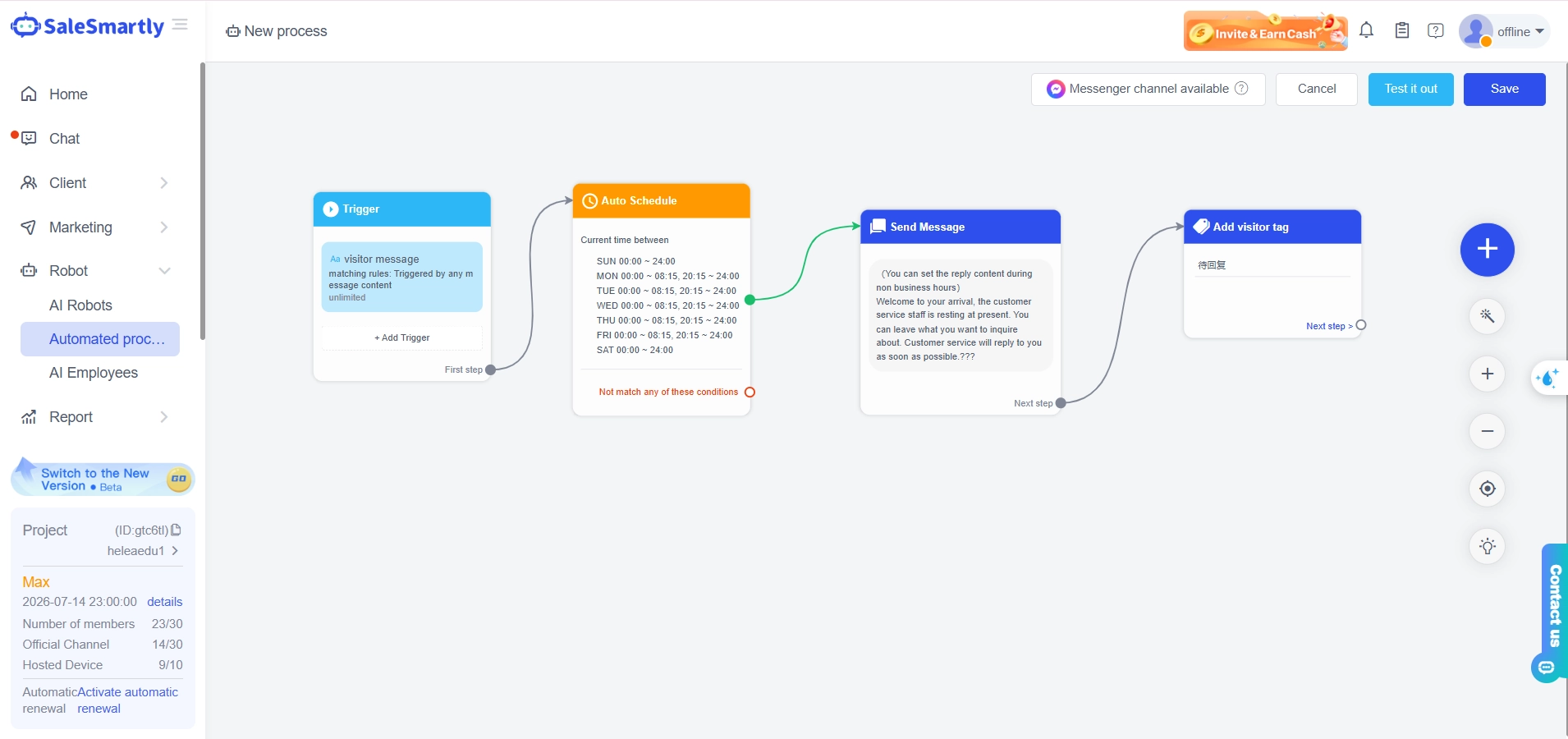 Beyond these three types, SaleSmartly's automation features also support advanced workflows: conversation routing, automatic agent assignment, and message sequences.## 5 Ready-to-Use Zalo Auto Reply TemplatesTemplate 1 — Welcome:> "Hello
Name
! Thanks for reaching out to
Store Name
. We specialize in
short description
*. Our team typically responds within 5 minutes (8:00 AM–10:00 PM)."*Template 2 — Price inquiry:> "Thanks for your interest! Our products range from
X
to
Y
*. Please share the product name or code so we can give you an accurate quote."*Template 3 — Shipping inquiry:> "We ship nationwide via GHN, GHTK, and J&T Express. Delivery: 1–2 days in major cities, 2–4 days to other provinces. Free shipping on orders above
Y
*."*Template 4 — After-hours:> *"We've received your message! Our team is currently offline but will respond as soon as we open. Thank you for your patience!"*Template 5 — Order confirmation:> "✅ Your order has been received! Our team will contact you within 30 minutes to confirm details. Thank you for shopping with us!"## Best PracticesKeep it concise. One or two messages per interaction. More than that risks annoying customers and triggering blocks.Always offer a human option. Automation handles routine questions — customers should still be able to reach a real person when needed.Personalize when possible. Including the customer's name makes automated replies feel significantly more natural.Test thoroughly before going live. Verify response timing, workflow logic, and escalation to a live agent across key scenarios.## Key Takeaways- Zalo auto replies address the real root cause of lost sales: slow response time
- The three most impactful types are welcome messages, keyword-based replies, and after-hours responses
- SaleSmartly lets you configure all three via drag-and-drop — no coding required
- Even a 1–2 person store can significantly reduce manual message handling with the right setupView SaleSmartly pricing and start a free trial — no credit card required, free setup support included.***## Frequently Asked Questions### What is a Zalo auto reply?A Zalo auto reply is an automated messaging feature that allows a business Zalo account to respond to customers automatically based on preset conditions — such as a first message, specific keywords, or messages sent outside business hours. The system operates 24/7 without requiring staff to manually handle each incoming message.### Should small online stores use Zalo auto replies?Yes. Even a store with 1–2 staff members can significantly reduce repetitive manual work through automation. Price, shipping, and size questions typically account for 70–80% of inbound messages — automating these frees staff time for actual sales conversations and order closing.### How does SaleSmartly connect to Zalo?SaleSmartly connects Zalo through a cloud-hosted device method — the Zalo account runs on a cloud device, enabling messages to be sent and received remotely without depending on a physical phone. This is the standard integration approach since Zalo does not have a public API like WhatsApp.### Can I configure different auto replies for different products?Yes. SaleSmartly allows you to create separate keyword groups and workflows for different product categories, question types, or customer segments — each with its own response content and logic.### What other channels does SaleSmartly support besides Zalo?SaleSmartly supports Facebook Messenger, Instagram, WhatsApp, TikTok, Telegram, LINE, and more — all managed from a single inbox. See the full list of integrations.***Ready to set up Zalo auto replies for your store? Start a free SaleSmartly trial* *— no credit card required, free onboarding support included.
How to Send Bulk WhatsApp Messages Legally and Effectively
Everything you need to know to run legitimate WhatsApp broadcast campaigns — opt-in requirements, template approval, 5 high-performing broadcast types, and how to stay off Meta’s ban list.
Why Your Shop Is Losing Orders Every Day (And You Don't Even Know It)
5 warning signs your online shop is losing orders daily due to poor inbox management — with real numbers, root causes, and a practical solution for Vietnamese shops.
