Zalo CRM: How To Connect Zalo With CRM And Choose The Right Fit
Key Takeaways
- Zalo CRM is a customer relationship management solution integrated directly with Zalo OA or personal Zalo, helping B2B teams synchronize customer data, conversation history, and lead classification from the Zalo channel into a single system.
- 94% of Zalo users prefer receiving business messages through the platform according to the Adtima Audience Pulse Business Messaging Landscape 2025 report, making Zalo the most important B2B communication channel in Vietnam.
- Teams need to clarify two factors before choosing a Zalo CRM: whether to integrate with Zalo OA or personal Zalo, and the current size of the sales team.
Most B2B sales teams in Vietnam communicate with customers through Zalo daily, but data from these conversations typically lives on individual employees' personal phones. When an employee leaves, the entire conversation history and customer information leaves with them. So what is Zalo CRM and how can you connect Zalo with CRM to manage customer data systematically?
What Is Zalo CRM?
Zalo CRM is a customer relationship management solution integrated directly with the Zalo platform, helping sales and customer service teams synchronize contact information, conversation history, and transaction data from Zalo OA or personal Zalo into a single CRM system.
With over 79 million monthly active users, Zalo is the most popular messaging platform in Vietnam. As a result, B2B teams communicate with customers and partners through Zalo every day, but data from these conversations typically exists as scattered messages across individual devices. Zalo CRM solves this problem by bringing all customer data from Zalo into a centralized management system where teams can classify, tag, track pipelines, and generate reports.
Zalo CRM differs from traditional CRM in its primary data source and customer outreach approach. Traditional CRM collects information from forms, emails, and phone calls, while Zalo-integrated CRM synchronizes data directly from conversations on Vietnam's most popular messaging platform.
| Criteria | Traditional CRM | Zalo CRM |
|---|---|---|
| Primary data source | Registration forms, email, phone calls | Zalo OA/personal conversations, ZNS |
| Customer outreach | Email, phone calls, advertising | Zalo messages, OA broadcast, ZNS |
| Message open rate | Email averages 20-25% | Zalo averages 70-80% in Vietnam |
| Two-way interaction | Email responses are slow | Real-time chat, immediate customer replies |
| Market fit | International, email-first B2B | Vietnam, B2B and B2C using Zalo as primary channel |
| Limitation | Low open rates in Vietnam | Platform-dependent, limited to domestic market |
For B2B teams operating in Vietnam, Zalo CRM complements traditional CRM by adding a communication channel with high response rates. Many teams run both systems in parallel to cover both domestic and international customers.
What Is Zalo CRM Used For?
Zalo CRM is suited for four main B2B use cases, from lead management to cross-department coordination within the team:
- Managing leads from Zalo OA: When customers follow the OA or message asking for information, the CRM automatically creates a lead, tags the source, and assigns it to the appropriate salesperson. The team tracks progress from outreach to deal closure on the pipeline.
- Post-sale customer care via ZNS: Sending order confirmations, maintenance reminders, and contract renewal notifications via ZNS based on CRM data. B2B customer service teams use this approach to maintain long-term relationships with existing customers.
- Re-engaging previous buyers: Segmenting customers by products purchased, order value, or most recent purchase date, then sending tailored offers via Zalo OA broadcast or ZNS. Zalo message open rates are significantly higher than email marketing in the Vietnamese market.
- Coordinating sales and customer service on the same system: When customers transition from the sales stage to post-sale support, the customer service team can see the entire conversation history with sales in the CRM. As a result, customers do not have to explain their issue from scratch each time they reach out.
How Do You Connect Zalo With CRM?
Teams can connect Zalo with CRM through two main methods. Integration via Zalo OA API synchronizes OA follower data with the CRM system, while connecting personal Zalo via cloud-hosted keeps employee accounts on a cloud platform for centralized management.
Integration Via Zalo OA API
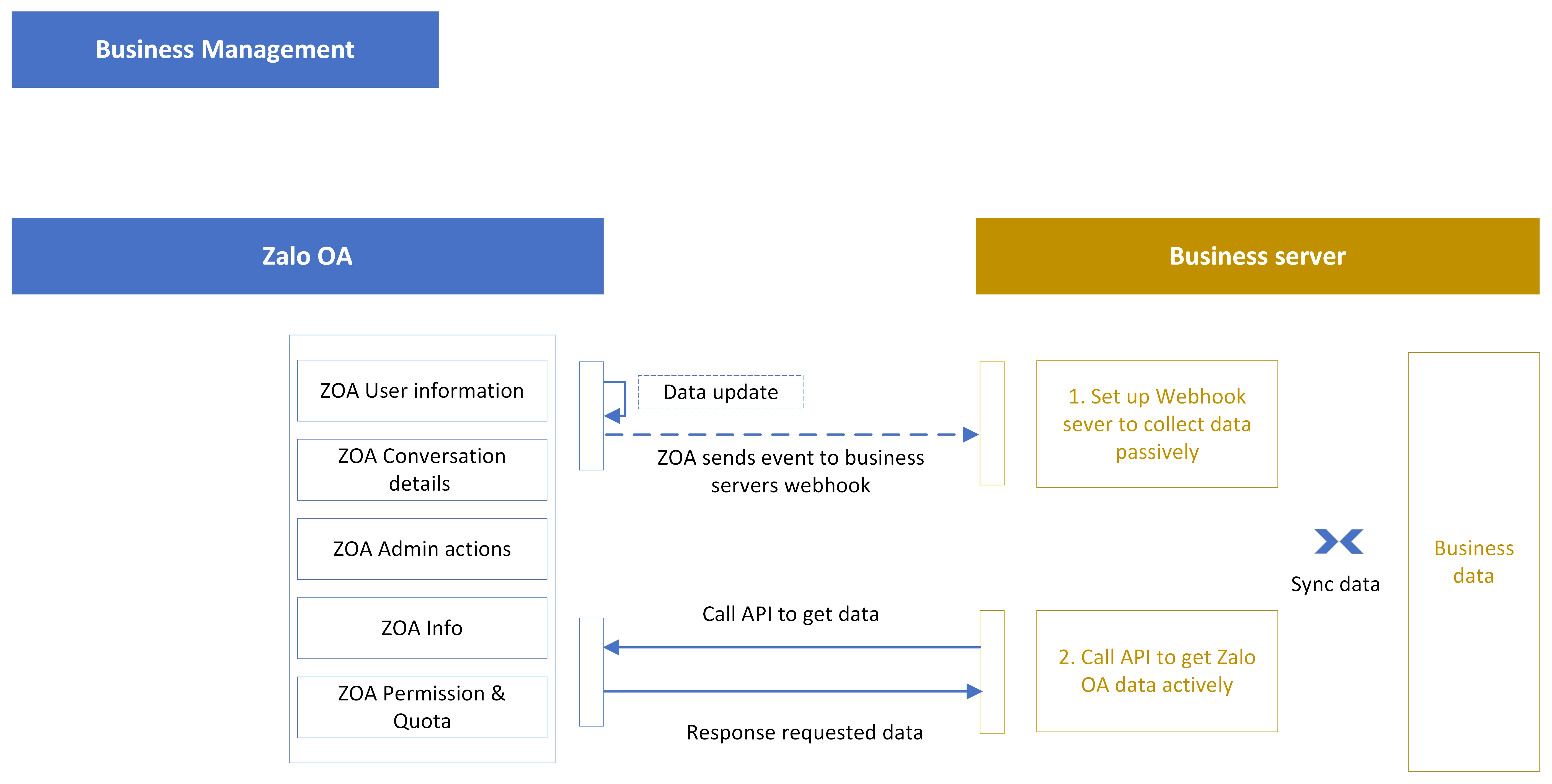
Zalo provides an official API that allows CRM software to connect directly with Zalo Official Accounts. Through this API, teams synchronize OA follower lists, message history, ZNS data, and interaction information into the CRM.
This integration method suits B2B teams using Zalo OA as their official brand channel. Additionally, the OA API supports broadcasting, ZNS messaging, and setting up Zalo chatbots to auto-respond directly from the CRM. However, customers must follow the OA first before the team can send proactive messages.
.png%3Fwidth=5607%26height=2833)
Connecting Personal Zalo Via Cloud-Hosted
Some platforms allow teams to connect employees' personal Zalo accounts to the management system by scanning a QR code. The Zalo account is stored on a cloud device (cloud-hosted), enabling teams to manage conversations from the CRM interface rather than individual phones.
This method suits sales teams that already have an established contact network on personal Zalo and need centralized management. However, unlike Zalo OA API, this is a connection through a personal login session, dependent on the employee's account.
The table below summarizes the differences between the two methods of connecting Zalo with CRM:
| Criteria | Zalo OA API | Personal Zalo Cloud-Hosted |
|---|---|---|
| Account | Zalo Official Account | Employee's personal Zalo App |
| Connection method | Official API from Zalo | QR code login on cloud platform |
| Data synchronized | OA followers, messages, ZNS | Personal contacts, 1-on-1 conversations |
| OA features | Broadcast, ZNS, OA store | 1-on-1 messaging, calls, groups |
| Best for | B2B teams needing an official brand channel | Sales teams with existing contact networks |
| Limitation | Customers must follow OA first | Dependent on individual employee accounts |
What Benefits Does Zalo-Integrated CRM Bring?
Zalo-integrated CRM helps B2B teams centralize customer data from Zalo conversations, automate lead nurturing workflows, measure sales performance by channel, and preserve all data when employees change.
Centralized Customer Data Management
Contact information, conversation history, employee notes, and lead status from Zalo are all synchronized into the CRM. As a result, sales and customer service teams access the same data source, reducing the situation where each employee keeps separate information on their personal phone.
Automated Lead Nurturing And Follow-Up
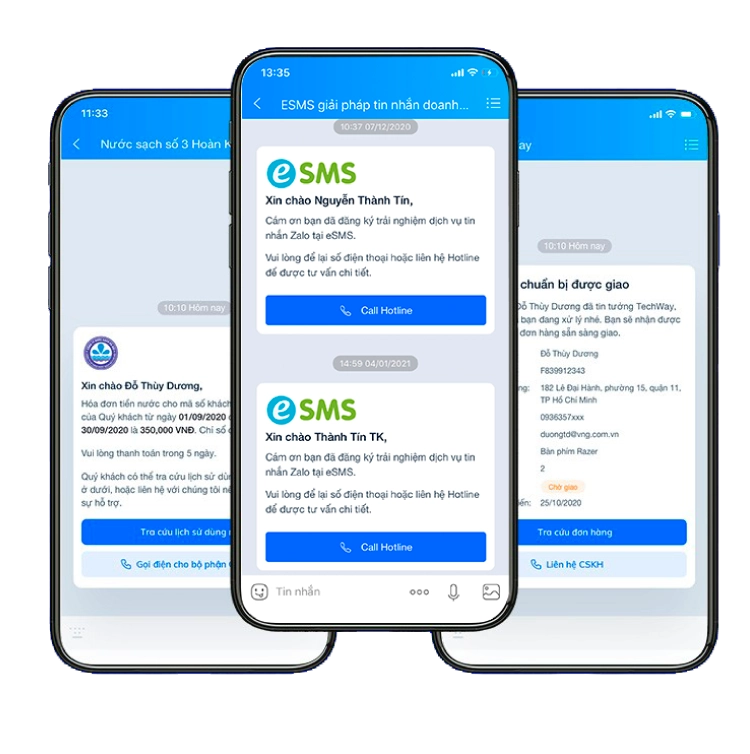
The CRM auto-tags customers when they message through Zalo, classifying them by status (new lead, interested customer, existing buyer). At the same time, the system sets up follow-up reminders on a timeline and sends periodic ZNS nurturing messages.
B2B sales teams typically track hundreds of leads simultaneously. Automation reduces the risk of missing high-potential leads, especially during nurturing phases that stretch over several weeks.
Sales Performance Measurement By Channel
Zalo-integrated CRM enables tracking conversation volume, conversion rates, and response time from the Zalo channel separately. This allows management to compare Zalo performance against other channels (Messenger, email, live chat) to allocate resources appropriately.
Platforms like SaleSmartly provide performance analytics dashboards by channel, by agent, and by shift, helping B2B teams evaluate the effectiveness of each communication channel.
Data Preservation When Employees Leave
When a salesperson leaves the company, their entire Zalo conversation history and customer information on personal Zalo typically disappears with them. Zalo CRM stores data on the system, allowing new employees to take over without any disruption to customers.
This is a critical benefit for B2B sales teams with staff turnover. Customer data belongs to the team, rather than depending on each employee's personal Zalo account.
How To Choose The Right Zalo CRM For Your Team
Your team should evaluate Zalo CRM based on four practical criteria, while answering two important questions before making a decision:
- Zalo integration type: Does the platform support Zalo OA API, personal Zalo cloud-hosted, or both? The choice depends on how your team currently communicates with customers.
- Omnichannel management capability: If your team uses Zalo, Facebook Messenger, WhatsApp, and email, the CRM should unify all channels into one interface rather than supporting only Zalo in isolation.
- Automation features: The CRM should support auto-tagging, follow-up reminders, lead assignment, and sending ZNS based on pre-built scripts.
- Reporting and analytics: The dashboard should display performance by channel, by agent, and by pipeline stage so management can make data-driven decisions.
Before choosing a solution, you need to answer two questions: Is your team looking to integrate with Zalo OA or personal Zalo? And how many people are on your current sales team? These two factors determine the right platform type and service plan.
The table below compares three popular Zalo-integrated CRM platforms in Vietnam:
| Platform | Zalo Integration | Core Focus | Best For |
|---|---|---|---|
| MISA AMIS CRM | Zalo OA API | Sales pipeline, quotes, accounting | B2B sales teams needing full pipeline management |
| Getfly CRM | Zalo OA API | Sales + marketing automation | SMEs needing CRM combined with email marketing |
| SaleSmartly | Personal Zalo (QR scan) + omnichannel | Omnichannel conversations, AI chatbot, 130+ language translation | CS teams managing conversations across multiple channels |
Deploying Zalo CRM With SaleSmartly
SaleSmartly connects employees' personal Zalo via QR code scan to a cloud platform, while also unifying conversations from Facebook Messenger, Instagram, WhatsApp, Telegram, and email into a single interface. B2B teams can operate Zalo CRM on SaleSmartly with three core capabilities:
- Customer data management from conversations: Recording contact information, classification tags, and interaction history from Zalo and all other channels into a single customer profile.
- Multi-model AI chatbot: Integrating ChatGPT, DeepSeek, Coze, or Dify to automatically classify requests and answer frequently asked questions on Zalo.
- Real-time translation across 130+ languages: Suited for B2B teams serving international customers alongside domestic customers via Zalo.
Experience how SaleSmartly helps your team manage Zalo and omnichannel conversations.
Conclusion
The first step when deploying Zalo CRM is to identify which Zalo channel your team uses most to communicate with customers. If your team primarily operates through Zalo OA, choose a CRM that integrates via Zalo OA API. If your sales team already has an established contact network on personal Zalo, a cloud-hosted solution enables centralized management while preserving the current workflow.
What Is CRM Software? Features, Types And How To Choose The Right Fit
CRM software is a tool for managing customer relationships. Learn the benefits, types by use case, and criteria to choose the right CRM for your team.
Online Customer Service Strategies For Omnichannel Teams
Guide to online customer service via Zalo, Facebook, Instagram, WhatsApp, and live chat. Strategies, workflows, and tools for omnichannel shops in Vietnam.
