5 Common Mistakes in Chatbot Design and How to Fix them
The strong development of AI tools such as ChatGPT and ERNIE Bot has fueled a wave of conversational AI applications in businesses. More and more companies are integrating chatbots into their websites and products to optimize operations and enhance interaction with customers.
At SaleSmartly, we started connecting with chatbots in February and have developed advanced chatbot features that help improve automation andcustomer service performance. Although chatbots bring many obvious benefits such as reducing personnel costs and increasing response speed, through analyzing more than 100 real use cases, we found that there are still many common mistakes in chatbot programming. These mistakes not only reduce operational efficiency but also make customers feel uncomfortable.
In this article, we will share the 5 most common chatbot design mistakes and practical solutions to help you build a more user-friendly and effective AI conversation experience.
Mistake 1: Not providing clear options in the conversation
Whether the chatbot is set up to make sales or answer customer questions, be careful not to put customers in conversation situations where they have no choice!Although chatbots help save time for the consulting team, if they only "ask questions" without providing "reference options", chatbots can easily cause customers to interrupt the conversation because they feel stuck. Open-ended questions can help gather information, but without specific instructions, customers won't know how to respond, leading to lost engagement and a reduced experience.
Solution: The chatbot script design must have a "button" to guide customers
To improve customers' shopping experience when using chatbots, you should optimize the product search process by classifying goods according to specific needs. For example, you can design buttons for "Men's Fashion" and "Women's Fashion" that help customers find the products they need in clear steps. Here's how:
Mistake 2: Putting too much information in the conversation without clearly dividing it
Responses that are too long and boring make it difficult for customers to read. When designing conversations, pay attention to: Don't use too many words!
To shorten the communication process, some users often respond with hundreds of words, making it difficult for customers to grasp the main idea. They have to scroll back to the beginning of the message to know what the subject is.The example below shows that the user used too many words to answer the question “What is SaleSmartly?”. Messages that are too long make it difficult for customers to focus on the main content and easily cause eye strain.
Solution: Divide content reasonably, make good use of buttons, images and external links
Instead of sending long paragraphs, break the content into short sections. Use buttons, images, or links to present information more clearly. For example, you can divide a complex topic into three clickable sections, each of which links to more detailed content. This not only increases readability but also helps users focus on the information they care about most.
Mistake 3: The script is too confusing, making the dialogue complicated
It is important to ensure that the design and organization of the chatbot's conversation interface is clear and user-friendly. A common mistake is creating a chatbot that reacts randomly instead of having a logical structure. This easily causes the content to be repeated or the chatbot to fall into a loop, disrupting the user experience.
Solution: Design the conversation script first, then install the chatbot!
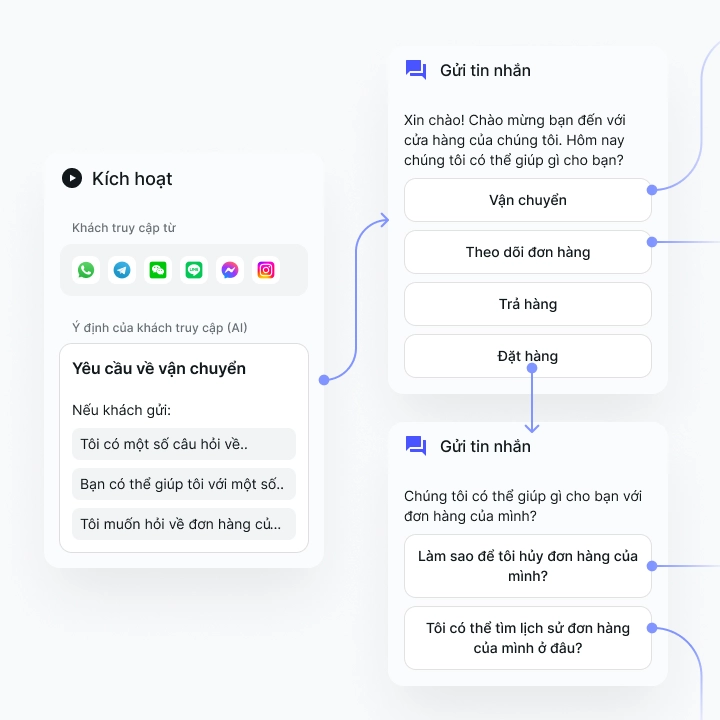
Before starting to build your chatbot, draft a coherent conversation script. List the necessary processes, break down the main and sub-topics, and identify the logical links between them. Avoid repeating content and make sure each conversation branch has an option to return to the main menu.
Step 1: Outline the necessary processes
Step 2: Divide into main and secondary branches, plan how to connect
Step 3: Expand the detailed content of each conversation
Step 4: Create intersection points to keep the conversation flow natural.
Let the conversation happen naturally. Explain what's happening and where the customer is going. Offer suggestions for next steps and gradually introduce features they can take advantage of.
 ## Mistake 4: Letting the robot pretend to be a human makes customers unable to tell the difference.
Besides the content and structure of the conversation script, if you want to provide a better experience for your customers, keep in mind the following: Be careful when letting a robot impersonate a real person in a conversation.
A friendly and natural tone can help increase interaction with users, but if too humanized, chatbots will easily mislead customers into thinking they are talking to a human. When chatbots cannot meet expectations, it can easily lead to feelings of disappointment and loss of sympathy from customers.
Solution: Avoid over-personalization and provide a "Connect to a support agent" option
Make sure customers always know whether they are interacting with a robot or a human. Integrate the option to forward chat to a real agent when needed.
This transparency helps build trust, better manage customer expectations, and create a professional, natural, yet effective service experience.
Mistake 5: Expecting chatbots to solve all problemsWhile chatbots can effectively handle many common and recurring questions, they are not a "universal solution." It is unrealistic to expect chatbots to completely replace customer service staff.
The most effective way to use chatbots is to integrate them into your overall customer care strategy. Chatbots can be programmed to handle and screen initial inquiries, and respond quickly to routine inquiries. This setup not only shortens ticket processing time, but also helps staff focus on more complex issues, situations that require sophistication and human interaction.
This approach benefits both businesses and customers. When chatbots take care of repetitive questions, customer service staff are relieved of monotonous workloads, increasing efficiency and job satisfaction. For businesses, this can lead to reduced personnel costs, while improving the quality of customer care.
In short, if used properly, chatbots can optimize customer service operational efficiency, without losing the human element — which is always necessary in personal and emotional interactions.## Conclusion: 5 common mistakes when designing chatbots
- Don't just create a conversation, design a chatbot script that must have a "selection button" to guide customers!
- Don't write too long a response. Make use of buttons, images, and external links to break content into clear sections!
- Don't make the conversation complicated. Write the conversation script first, then set up the chatbot!
- Don't let robots pretend to be human. Make it clear to customers and always have the option to “chat with a member of staff.”
- Don't expect the chatbot to be able to operate the fanpage alone. Let humans handle complex situations.
The above notes are just part of the process of designing an effective chatbot. Every conversational application needs to be researched on user behavior from the early stages and tested multiple times to ensure it brings real value, instead of being annoying, repetitive or annoying to users.
Hopefully through this article, you have a better understanding of how to build chatbot content and conversations. Apply these suggestions now to confidently start designing chatbots for your business!
👉 If you want to learn more about chatbot conversation design, sign up for a free trial of SaleSmartly today!***
5 Popular Translation Tools for International E-Commerce
To eliminate language barriers when doing business globally, businesses should know these 5 popular real-time translation tools for international e-commerce. Communicating with international customers is no longer a challenge, the gap with customers is increasingly narrowing.
How For Businesses To Distribute Smart Conversations In SaleSmartly
Detailed instructions on 4 ways to allocate smart conversations to employees in SaleSmartly software: rotating allocation, based on professional skills, self-selecting conversations, based on workload.
